QUICK VERDICT
A connected job record, with details to verify.
I could follow a job from lead and quote to customer decision, order, recorded payment, materials, expenses, and reports without rebuilding it in a second workspace.
- Best reason to test: A quote and order workflow connected to vehicle and business records.
- Strongest tested area: The Quote Portal, including email OTP verification, revisions, requests for changes, approval, decline, and activity history.
- Main caution: Real card charges, live SMS, Google Calendar reconnect, and live AI calls remain untested.
- Trial priority: Check real card charges, live SMS, Google Calendar reconnect, and live AI calls that I did not test.
My take: Auto Detailing CRM merits a closer look because I could exercise substantial parts of the connected job path. It is not an automatic purchase recommendation. The original lead-source and Leads footer issues did not reproduce in the September 30 retest; the membership usage rollback issue did not reproduce on October 3. The original Membership Overview revenue inconsistency no longer reproduced in the October 6 controlled retest after a later production update. I would still test the handoffs with my own sample jobs before importing customers.
This review is for a solo mobile detailer or small team evaluating whether one detailing CRM can hold the work from first inquiry to business-cost review. If your immediate problem is deciding whether to buy software at all, start with our solo-operator decision guide. For a broader checklist, use our mobile detailing CRM guide.
TEST SCOPE
What I actually put through the workspace.
In September 2026, I created customers, vehicles, leads, quotes, memberships, inventory, vendors, and expenses in a dedicated workspace. I moved quotes through the customer portal, converted a quote to an order, edited and progressed the order, recorded partial and full payments, and opened expense and Insight report drill-downs. I also inspected AI Voice Assistant settings and added and removed a blocked caller.
This was a manual sample workflow, not weeks of live shop operation. I did not send real customer-facing SMS quotes, invoices, or reminders; process a real charge; use Tap to Pay; reconnect Google Calendar; place a live AI call; or trigger destructive external integrations. Email OTP verification in the Quote Portal did work in the test. The Account / Subscription screen showed a Growth annual plan marked Paid active with Manual override active, so access in this workspace cannot establish standard Growth entitlements.
“I tested” refers to an action I performed. Vendor feature and pricing descriptions are labeled as such. “My take” is my editorial judgment about what the evidence means for a detailing business.
WHAT THE PRODUCT IS
Job management built around the customer and vehicle.
Vendor description: Auto Detailing CRM presents itself as software connecting calls, booking requests, quotes, scheduled work, payments, and job costs around a customer and vehicle. Its public feature pages describe leads, quotes, orders, memberships, inventory, vendor expenses, reporting, and AI voice.
Observed in my test: I could move among the manual customer, quote, order, cost, and reporting paths in one workspace. That continuity is the product's practical appeal for a detailer who currently copies the same vehicle and job details between tools.
The distinction is easier to appreciate in a trial than on a pricing grid. A contact record alone is of limited use when the vehicle, approved work, amount due, materials, and vendor expense live elsewhere. Here I could follow those parts of a sample job in the same workspace. Whether they remain accurate after conversion and reporting is the more important question, and that is where my test found the cautions discussed below.
CORE WORKFLOW
From inquiry to an order I could inspect.
Lead and vehicle
I created leads, customers, and vehicles, then converted a lead to a customer and order. The handoff kept me in one workspace. Check source attribution after conversion, and configure the vehicle body types your shop uses before relying on them for pricing.
Quote and revision
I created and revised quotes, then tried customer change requests, approval, and decline. That matters when a first estimate changes after a closer look at a vehicle or a conversation about scope.
Order and calendar
I converted a quote into an order, edited it, progressed its status, and exercised the order-calendar linkage inside the CRM. An approved estimate could move into the work schedule without beginning a new record.
Recorded payment
I recorded partial and full payments and inspected the order's payment state. Recording a payment is different from processing a real charge; payment links, card charges, and Tap to Pay still need a separate live test.

In my original test workspace, Truck had not been configured as a vehicle body type. When a 2020 Ford F-150 was created through Lead → Customer + Order, its structured record showed Sedan. The developer pointed out the missing class. In follow-up testing, I added Truck in Settings with a test surcharge and manually reassigned the F-150; only then did its record show Truck. On September 30, I preconfigured a matching structured 2021 Ford F-150 as Truck before converting a new lead. Conversion reused that vehicle, including its plate RETEST930, and retained its Truck body type; Full Detail became $250 from a $200 base with the configured 25% surcharge on order ORD-0008. This does not establish automatic body-type recognition from “F-150” text alone. If body type affects price, configure your classes and inspect converted vehicles before relying on them.
My take: The value is the connected record: customer request, vehicle, accepted quote, resulting order, and unpaid balance. Before importing customers, try a truck whose body type affects price, a revised quote, and a partial payment; inspect each downstream record.
This is especially relevant when the person who quotes the job is also the person doing it. They need to know which version the customer accepted and what remains to collect without reconstructing a text thread. My test shows that the manual transitions can be exercised. After converting a lead, check attribution and vehicle classification in your own setup; the September 30 lead-source retest passed, while the Truck retest depended on a preconfigured structured vehicle.
QUOTE PORTAL
The customer-decision path received a real test.
The Quote Portal received the deepest test. I published a quote, verified a customer by email OTP, revised the quote, requested changes, tested approval and decline paths, and inspected its activity history. Those actions gave me a clearer view of the customer decision process than a feature list could.
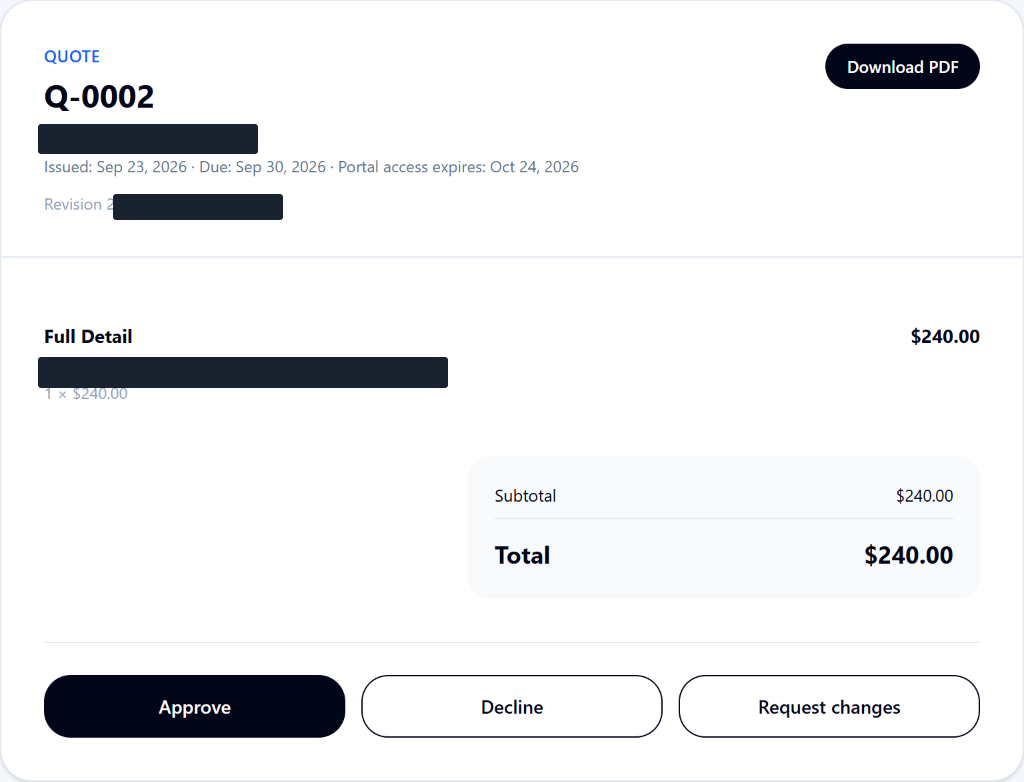
For a detailer, a revised estimate needs an understandable decision trail. A coating quote may change when condition or scope becomes clearer. Observed in my test: the portal showed the publishing, revision, decision, and history paths. Vendor description: approval stays tied to the exact revision reviewed by the customer. I exercised revisions and decisions, though I did not audit every edge case of that rule.
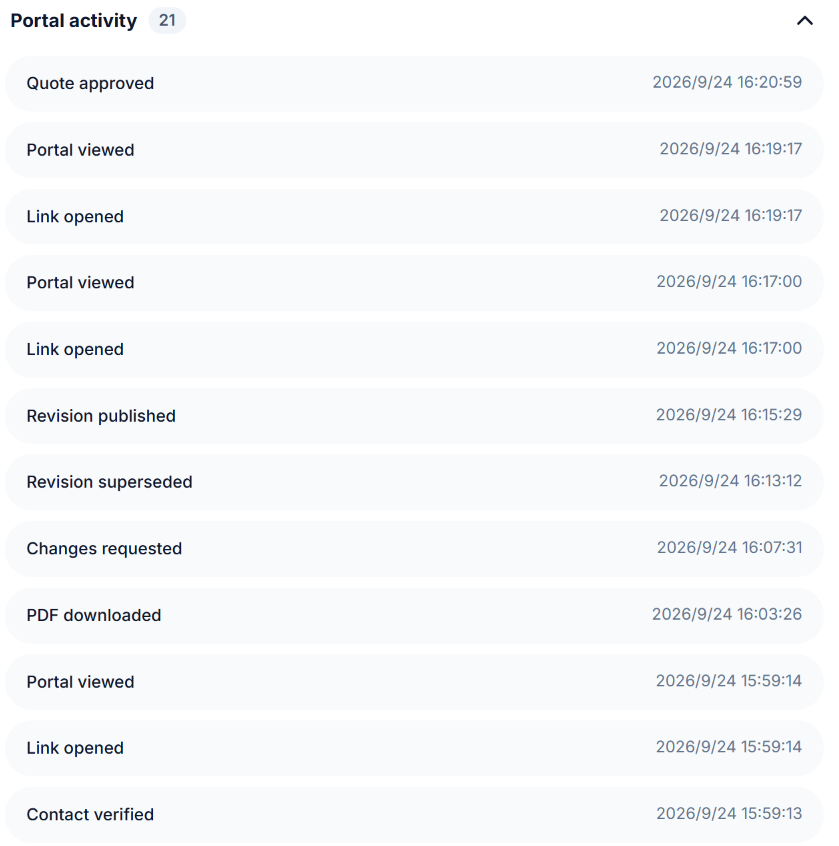
Email OTP verification succeeded. I did not send a live SMS quote link, so shops that rely on text messages should check delivery, timing, and cost before making the portal their only approval route.
The portal is useful because a customer decision can be more specific than “yes” or silence. In my test I could request changes, approve, and decline; the activity history gave the shop a place to review those actions. For a detailer selling paint correction or a coating, the difference between accepting the original scope and asking for a revised one can affect both the booked time and the final price. I would test a changed-scope scenario before using a portal approval as the handoff to the calendar.
Send a sample quote to an address you control. Verify by email OTP, request a scope change, publish a revision, make a decision on the revised quote, and inspect the activity history. Then check the resulting order for the approved scope and vehicle.
REPEAT WORK AND COSTS
Memberships, materials, and vendor bills are more than labels.
Memberships: I created a plan, assigned it manually, and saw an included service reduce an order's price from $250 to $0. Saving that order raised usage from 0 / 1 to 1 / 1. The original deletion problem described below did not reproduce in the October 3 controlled retest: deleting the benefit order restored the allowance, and a new order could use it again at $0. Before selling a plan, also verify renewal billing and customer communication in your account.
Inventory and materials: I created inventory records, attached materials to orders, and exercised reservation and release behavior. The material record interacted with the work rather than sitting in a separate supplies list. For a coating or other costly consumable, check when stock moves and how that cost appears in the order and reports.
Vendors and expenses: I created vendors and expenses, recorded partial and full vendor payments, and opened expense reports. In the original test, a fully paid $30 Order Cost expense linked to ORD-0002 appeared as $30 in the detailed Expenses report while the Expenses-page summary showed $0.00, leaving that summary's meaning unclear. The developer said the behavior was improved. On September 30, I verified that a paid $37 expense showed View/Edit but no Delete action. Voiding its payment returned it to Unpaid with a $37 balance and made Delete available. Deletion succeeded and returned the underlying Order Cost to the waiting-for-expense pool. This is the intentional paid-expense workflow described by the developer, verified in this retest.
These modules matter at different points in the job. A membership tracks the customer's repeat-service allowance. Inventory accounts for materials reserved or released as an order changes. Vendor expenses capture amounts owed and amounts paid. I would test them together with one sample maintenance job: use a membership service, attach a material, enter a vendor expense, then inspect the order and reports. That is a more demanding test than checking whether each menu opens, and it reveals whether the numbers support the decisions an owner actually makes.
REPORTS AND AI
Reports need reconciliation; AI needs a live call.
I opened expense and Insight reports and used their drill-downs. The original $30 Order Cost observation exposed ambiguity about what the Expenses-page summary counted. The developer said the behavior was improved. In the September 30 retest, the current page labeled its outstanding summary “ORDER COSTS TO PAY”: it moved from $37 to $0 when I paid the new expense. At that point, Insight → Expenses for September 1–30 showed Total $67 / Paid $67 / Open $0 / Order Cost $67, including the earlier $30 and new $37 paid expenses. After I voided the new payment and deleted its expense, the $37 underlying Order Cost returned to “Order costs waiting for an expense record,” and ORDER COSTS TO PAY returned to $37. The operational outstanding-to-pay summary and recorded expense reporting answer different questions; this was not a full accounting validation.
I also inspected AI Voice Assistant configuration and added and removed a blocked caller. That was a settings test, not a live AI call. The vendor markets an AI receptionist and lists usage terms in its pricing; test a controlled call with your real service menu, hours, and escalation rules before relying on it to answer customers.
For reports, I would begin with a small ledger of known sample facts: quoted amount, recorded partial payment, material, and vendor bill. Then I would open each Insight drill-down and ask which entries it includes. A dashboard total can look plausible even when the detail report says something different. My test covered navigation and controlled records, not a reconciliation of a working shop's books.
WHAT WORKED IN TESTING
The useful parts were the connected transitions.
- Customer decisions stayed visible.The Quote Portal covered verification, revision, change requests, approval, decline, and history.
- The job kept moving.Quote conversion led to an editable order, status changes, an in-CRM calendar link, and recorded payment states.
- Costs had a path into the record.Materials, inventory states, vendor expenses, and reports let me inspect more than revenue alone.
- Repeat work could be recorded.I created a membership plan, assigned it manually, and used a service. Deletion did not restore that use in the original September test; usage restoration passed the October 3 controlled retest.
That breadth earns Auto Detailing CRM a place on a hands-on shortlist. Its fit still depends on whether your own awkward sample job survives each handoff accurately.
ISSUES I ENCOUNTERED
What I found — and what changed after retesting.
1. Lead source changed to website — no longer reproduced
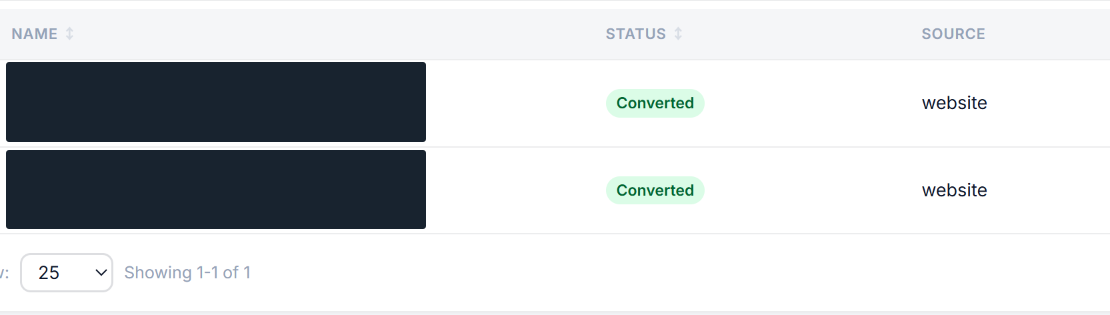
During my September 2026 test, I created a lead with Source set to “No source” and “Lead came from website” left unchecked. The Leads table nevertheless displayed its source as “website.” After I converted that lead to a customer and order, the generated order notes also included “Source: website.” This was not just a misleading table label in my test; the attribution value appeared downstream. If referral and ad-source reports influence spending, verify this path with deliberately different sample sources.
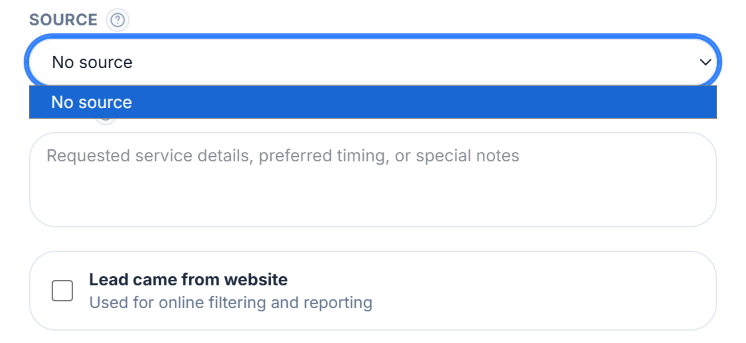

Retest update — September 30, 2026: I repeated this path with Source set to No source and the website checkbox unchecked. The Leads table showed no website attribution (Source displayed as —), and converted order ORD-0007 did not contain “Source: website” in its notes. The original issue did not reproduce in the current release.
2. Deleting an order did not restore membership usage — not reproduced in the October 3 retest
During my September 2026 test, an active membership included one Full Detail at a 100% discount. The Truck service normally cost $250; the first order correctly applied the benefit at $0. Saving it moved usage from 0 / 1 to 1 / 1, and Membership Usage History recorded the use. A second order correctly showed “Usage limit reached” and the normal $250 price. I then deleted the benefit order. It disappeared from Orders, but usage stayed at 1 / 1, Usage History still showed the use, another Full Detail order still showed the limit reached and $250, and Insight → Membership Usage still counted Times Used = 1. In this test, deleting the order did not restore the customer's included service.
Original September test evidence: The following screenshots document the original usage rollback finding, not the October 3 behavior.
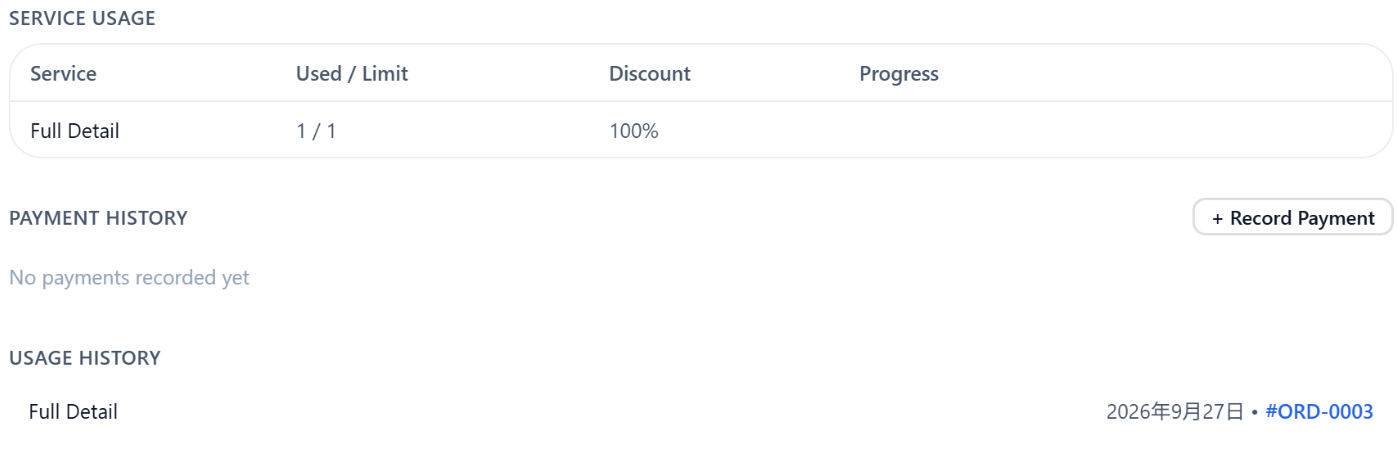
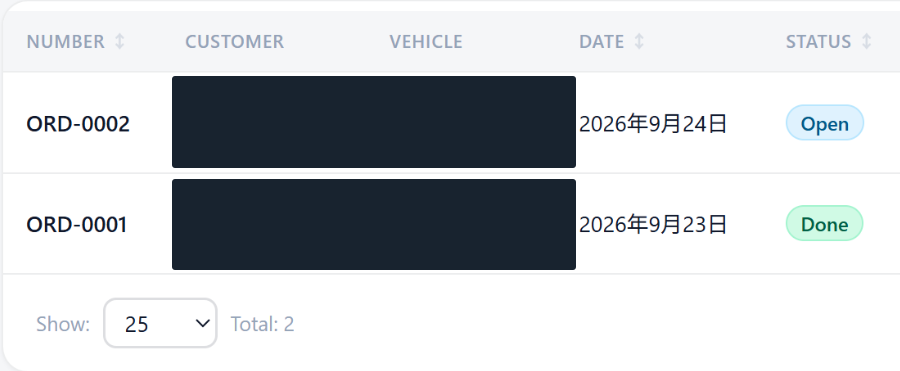
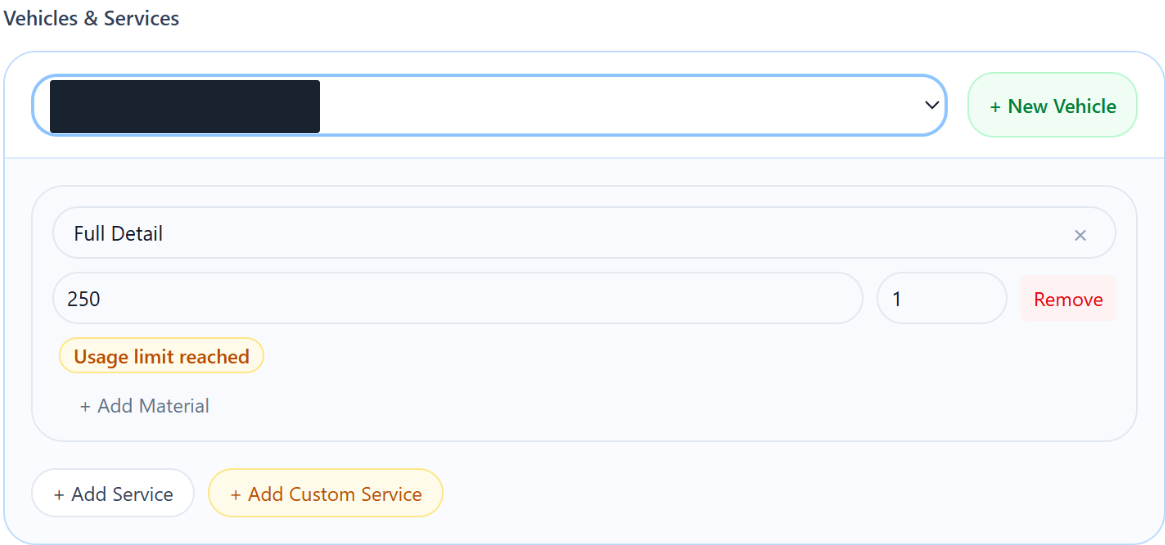
Retest update — October 3, 2026: After the developer said this behavior had been fixed, I independently retested it with a fresh Active $49/month membership, Manual billing, Customer binding, and one Full Detail benefit at a 100% discount with a usage limit of 1. No payment was recorded. Usage started at 0/1. The Full Detail order for the test customer's Toyota Camry showed “Included in Membership” and Grand Total = $0; saving ORD-0009 moved usage to 1/1 and added it to Usage History. Deleting that benefit order restored usage from 1/1 to 0/1. I then started a new Full Detail order for the same customer and vehicle: it again showed “Included in Membership” and Grand Total = $0, so the benefit could be used again. The original membership usage rollback issue did not reproduce in this controlled retest. This result does not establish behavior across every membership configuration or billing mode.
3. Membership Overview counted unpaid plan value as revenue — original issue no longer reproduced in the October 6 controlled retest
In the original September test, a $49 membership with Manual billing was Active, but Membership Details said “No payments recorded yet.” P&L Summary showed Membership Payments = 0 and Membership Revenue = $0. Insight → Membership Overview showed Total Revenue = $49. That is a reporting or labeling inconsistency in this controlled test, not a claim about broader accounting accuracy. A shop should confirm what “Revenue” means in each membership report before relying on it.
Original September test evidence: The following screenshots preserve the original no-payment and report observations.
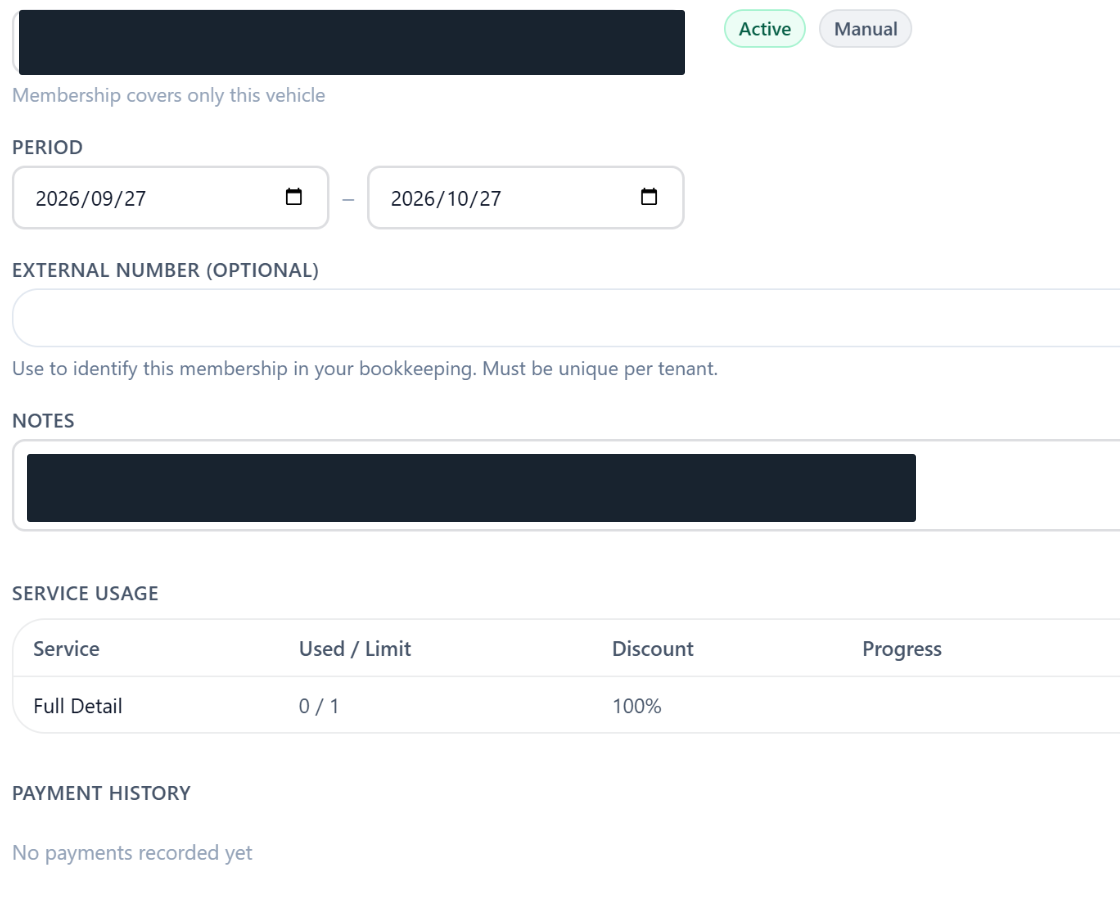

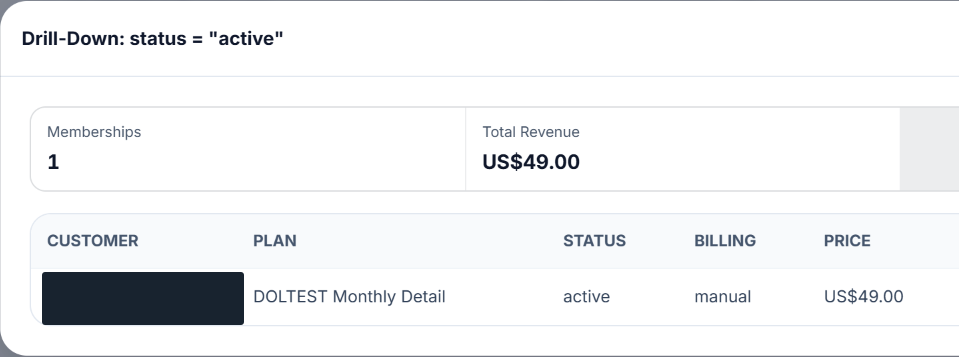
Retest update — October 3, 2026: The developer later said the reporting behavior had been addressed. I independently retested the same fresh Active $49/month membership with Manual billing; Payment History still said “No payments recorded yet.” With both reports set to October 3, 2026 through October 3, 2026, Insight → P&L Summary showed “No data found for this period.” Membership Overview's top-level view showed active = 1 and total memberships = 1, with no revenue amount shown. Opening its active drill-down showed Memberships = 1 and Total Revenue = US$49.00, alongside the test customer, plan, Billing = manual, and Price = US$49.00. The original reporting inconsistency still reproduced: Membership Overview still labeled the unpaid $49 plan value as Total Revenue while the same membership had no recorded payment and P&L showed no data for the period. P&L did not recognize membership revenue in this zero-payment sample; the finding still concerned Membership Overview's reporting or labeling at the time of the October 3 retest.
Final reporting retest — October 6, 2026: The developer later reported a further production update so Membership Overview revenue would be based on recorded membership payments rather than plan price alone. I retested the same Active, unpaid Manual membership for customer Retest Membership 1002 on the RETEST-1002 Monthly Detail plan ($49/month). Previous controlled evidence showed “No payments recorded yet”; no $49 membership payment had been recorded or confirmed. P&L Summary, set to October 3, 2026 through October 3, 2026, showed “No data found for this period.” In the same membership/date context, Membership Overview's active drill-down showed Memberships = 1, Plan price = US$49.00, Billing = Manual, Revenue = US$0.00, and Total Revenue = US$0.00. The original reporting inconsistency no longer reproduced in this October 6 controlled retest. This result does not establish behavior for every billing mode or validate all reporting.
4. Leads footer count did not match visible rows — no longer reproduced
At one point, multiple lead rows were visible while the footer showed a count similar to “Showing 1-1 of 1.” That is an observed list or pagination-state inconsistency, not evidence that records were lost. The mismatch made the list harder to interpret while scanning leads.
Retest update — September 30, 2026: With three visible lead rows, the footer correctly showed “Showing 1-3 of 3.” The original mismatch did not reproduce.
During an order payment-state update in the original September test, a Next.js “Server Action ... was not found on the server” message appeared once. A normal refresh recovered the page; the error was not reliably reproduced. The developer later said this transient issue had been addressed, but Detailer Ops Lab did not independently verify that specific fix.
WHO IT MAY FIT
Match the purchase to the awkward job.
- You are a solo operator or small team that wants customer and vehicle context to stay with quotes and orders.
- Customers need a review and approval path when service scope changes.
- You want to enter membership usage, materials, and vendor costs in the same operational workspace.
- You can spend trial time checking converted records and report definitions before importing production data.
- Your business depends on real SMS quote, invoice, or reminder delivery; I did not send those to live customers.
- You need Stripe charges, Tap to Pay, refunds, or payment receipts proven in the exact account configuration.
- Google Calendar reconnection or live AI call handling is operationally critical.
- Lead-source attribution and vehicle body type feed pricing, advertising decisions, or management reports.
A shop that only needs scheduling and invoices may prefer a smaller tool. Our mobile detailing software guide provides a broader shortlist, and the software cost guide puts fees against job volume. Our QuoteIQ review is documentation-based, so its evidence level differs from this hands-on review.
For a solo operator, the question is whether the connected records save enough follow-up and re-entry to justify the subscription and setup. For a small crew, it becomes whether the order, calendar, and costs give everyone the same view of the job. I tested the manual record flow, so either buyer can use this review to choose a trial scenario. They should still verify the real customer messages, payment processing, and any external calendar or AI service their business would depend on.
PUBLISHED VENDOR PRICING
Published plans are separate from my test.
The prices and tier boundaries below come from Auto Detailing CRM's public pricing page, checked September 29, 2026. They are vendor-published terms, not prices inferred from my workspace or a billing test. Verify the checkout total, taxes, transaction charges, messaging use, and any AI usage before buying.
| Plan | Published monthly price | Selected listed capabilities | Trial question |
|---|---|---|---|
| Essential | $39/month | Quotes, orders, invoices, customer and vehicle history, calendar, online booking, payment links, up to two users, 50 SMS credits/month | Does this cover your actual quote-to-payment routine? |
| Core | $79/month | Essential plus Secure Quote Portal, leads and website lead capture, inventory and vendors, calendar sync, Tap to Pay, 100 SMS credits/month, AI Voice available with separate usage billing | Do the portal and operational modules save enough manual work? |
| Growth | $109/month | Core plus memberships, 200 SMS credits/month, and 200 AI credits/month, with published lead and quote/order limits | Will membership and AI usage justify the higher tier? |
Vendor prices checked September 29, 2026. The same page lists annual billing at $429, $869, and $1,199 respectively, a free trial, and AI usage above the plan limit at $0.30 per credit. It says Core AI Voice usage is billed separately. Terms can change. The test workspace showed Growth annual and Paid active, with Manual override active; its access cannot be used to infer standard Growth entitlements or an actual charge paid by the publisher.
My take: Do not compare only the $39 entry price with another CRM's complete workflow. The vendor lists the Quote Portal, leads, inventory, and vendors on Core; memberships appear on Growth. Choose the lowest tier that contains the work you need, and verify access in an ordinary account. The test workspace's manual override prevents me from treating its available features as a normal plan checklist.
TESTING METHOD AND DISCLOSURE
Independent coverage, bounded evidence.
Detailer Ops Lab is an independent software research and comparison publisher, not a detailing shop or Auto Detailing CRM vendor. I used a dedicated workspace and sample workflows in September 2026. Its Account / Subscription screen displayed Growth, Annual, Paid active, and Manual override active. I do not know why the override was present and do not treat feature access as standard Growth entitlement. The supplied record did not identify the device or browser used.
I avoided live customer SMS, real payment charges, Tap to Pay, Google Calendar reconnection, live AI calls, and destructive external integrations. Email OTP verification in the Quote Portal was tested successfully. Findings from the original September test were sent to the developer. After publication, the developer reported several changes, and Detailer Ops Lab ran a targeted regression retest on September 30, 2026 covering lead source, Leads count/pagination, paid-expense deletion, Order Costs behavior, and conversion with a preconfigured Truck. The two membership findings were not part of that September 30 retest. After further developer-reported changes, a separate membership regression retest on October 3, 2026 independently verified usage restoration after deleting the benefit order and reuse of the included benefit at $0 in the controlled sample. The Membership Overview revenue inconsistency still reproduced for the unpaid manual membership on October 3. After the developer reported a later production update, the final Membership Overview production retest on October 6, 2026 no longer reproduced that revenue inconsistency for the same unpaid manual membership. Only explicitly labeled retest results should be read as independently verified behavior at the stated retest date; the October 6 result supersedes the October 3 reporting status. The developer-reported Server Action fix was not independently verified. Editorial conclusions remain with Detailer Ops Lab.
PUBLIC PRODUCT SOURCES
Where the vendor claims came from.
Vendor pages checked September 29, 2026. The hands-on observations come from the publisher's original September test, September 30 targeted retest, October 3 membership retest, and October 6 final Membership Overview production retest, not these marketing pages.
FINAL ASSESSMENT
Run one messy job before deciding.
Auto Detailing CRM carried a substantial manual flow in my test: quote decision, order, recorded payment, materials, cost, and report. The Quote Portal was the deepest-tested part. The original lead-source issue did not reproduce in the September 30 retest, and membership usage restoration passed the October 3 controlled retest. After a later production update, the original Membership Overview revenue inconsistency no longer reproduced in the October 6 controlled retest. Real card charges, live SMS, Google Calendar reconnect, and live AI calls remain untested. Configure your vehicle classes first; then use a revised quote, an included membership service, a partial payment, and a vendor cost to inspect what carries forward.
Use the CRM trial checklist →